My homelab journey: how I started and what I’d recommend today
I started my homelab journey in high school with a Raspberry Pi and almost zero knowledge of Linux systems. Today, I manage a multi-site home network and recently completed a cloud security internship at MongoDB. That experience is why I believe a homelab can be valuable if you want to work in cloud security.
Here’s how I got started, what I learned along the way, and what I’d recommend if you’re starting today.
What is a homelab?
a homelab is a server (or servers) connected through a network to each other and other devices where you can test and try different techniques of management on them.
Source: How-To Geek
The origins
During my second-to-last year of high school, I participated in CyberChallenge.IT, a nationwide cybersecurity competition. It was an amazing yet scary experience, as it was my first experience of a university environment. The teachers were university professors or PhDs, and my peers were mostly university students. At that time, I only knew how to code at a beginner level, so jumping into buffer overflows was exciting and confusing at the same time.
While continuing the course and also preparing for the national competition, I met other students who were really into the project and willing to spend their nights working on CTFs to improve, which led to the creation of the K1nd4SUS CTF team. It’s safe to say I had a blast. I was very privileged to be with such smart, knowledgeable, and cool people who also had the patience to help me while I was just starting out.
Anyhow, one of them had this weird-looking, pure-HTML dashboard with many buttons on it, and when he clicked them, web services I’d never seen popped up. So I asked him, “Hey, what’s that?” and he said, “That’s my homelab.” I was so hooked on what he was showing me that I really wanted to do it too. So, with his help, I started out with a Raspberry Pi 4.
My first setup
I started with the basics: setting up a new Linux user, SSH, packages, and basic Linux configurations. This was the very first time I started to tinker with a proper Linux installation instead of a Kali VM for CTFs. The first thing I installed was an OpenVPN server, a way to access my server remotely even when I was not at home. I had to fight with the ISP router’s admin panel, IPs, DuckDNS for dynamic DNS, and client settings. I then went on to install Pi-hole, simple web servers, and other small containers. Every time I looked at my friend’s setup, new cool services showed up, so I started trying them out myself.
By the time I finished high school, I already had a pretty good understanding of how Linux machines worked and what basic server administration involved, so I upgraded.
I received a regional scholarship for my final high school grade, which allowed me to buy computer parts. In the end, I managed to build a full-tower server with 2 x 4 TB hard drives, 16 GB of RAM, and a small SSD.
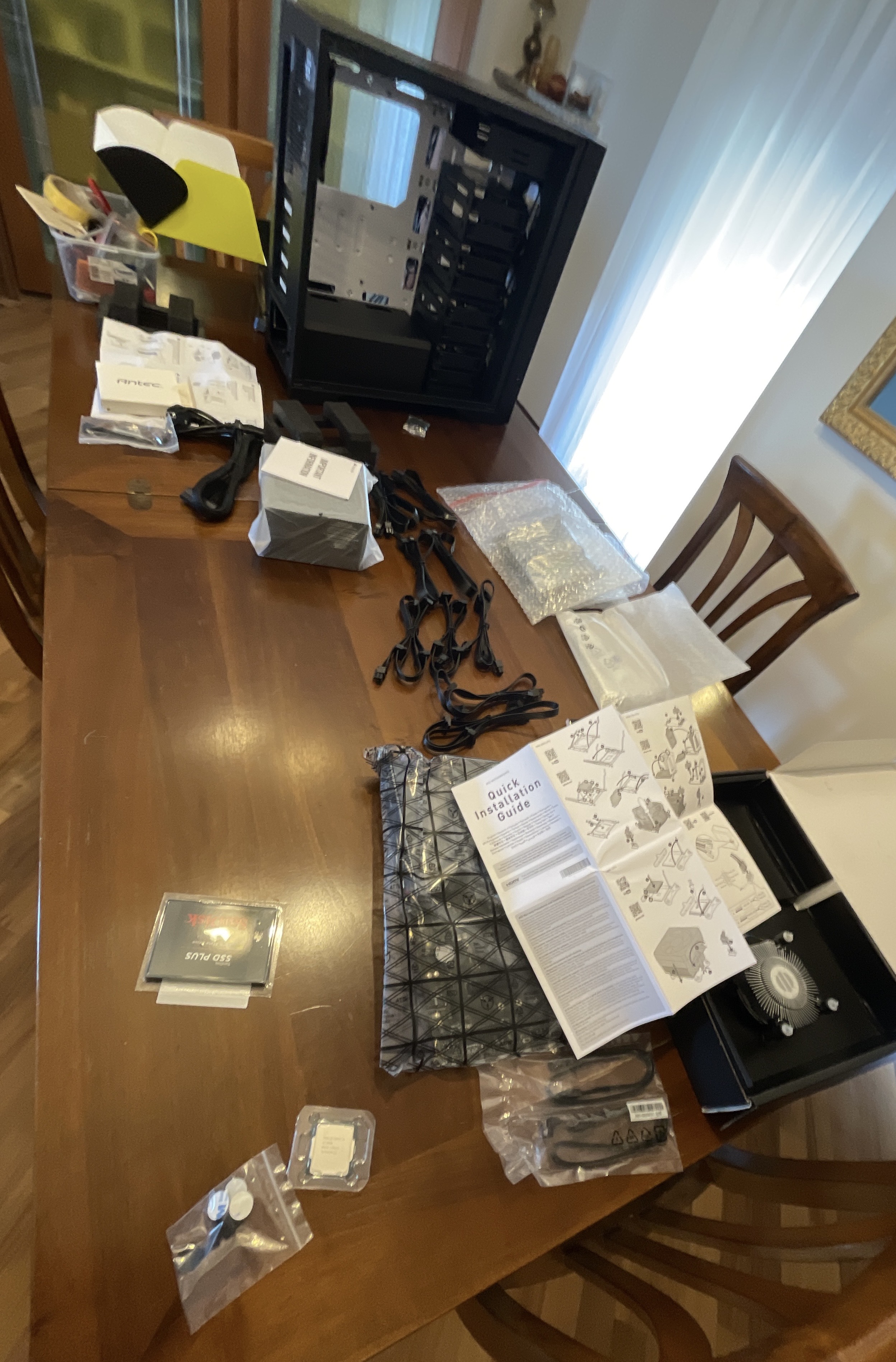
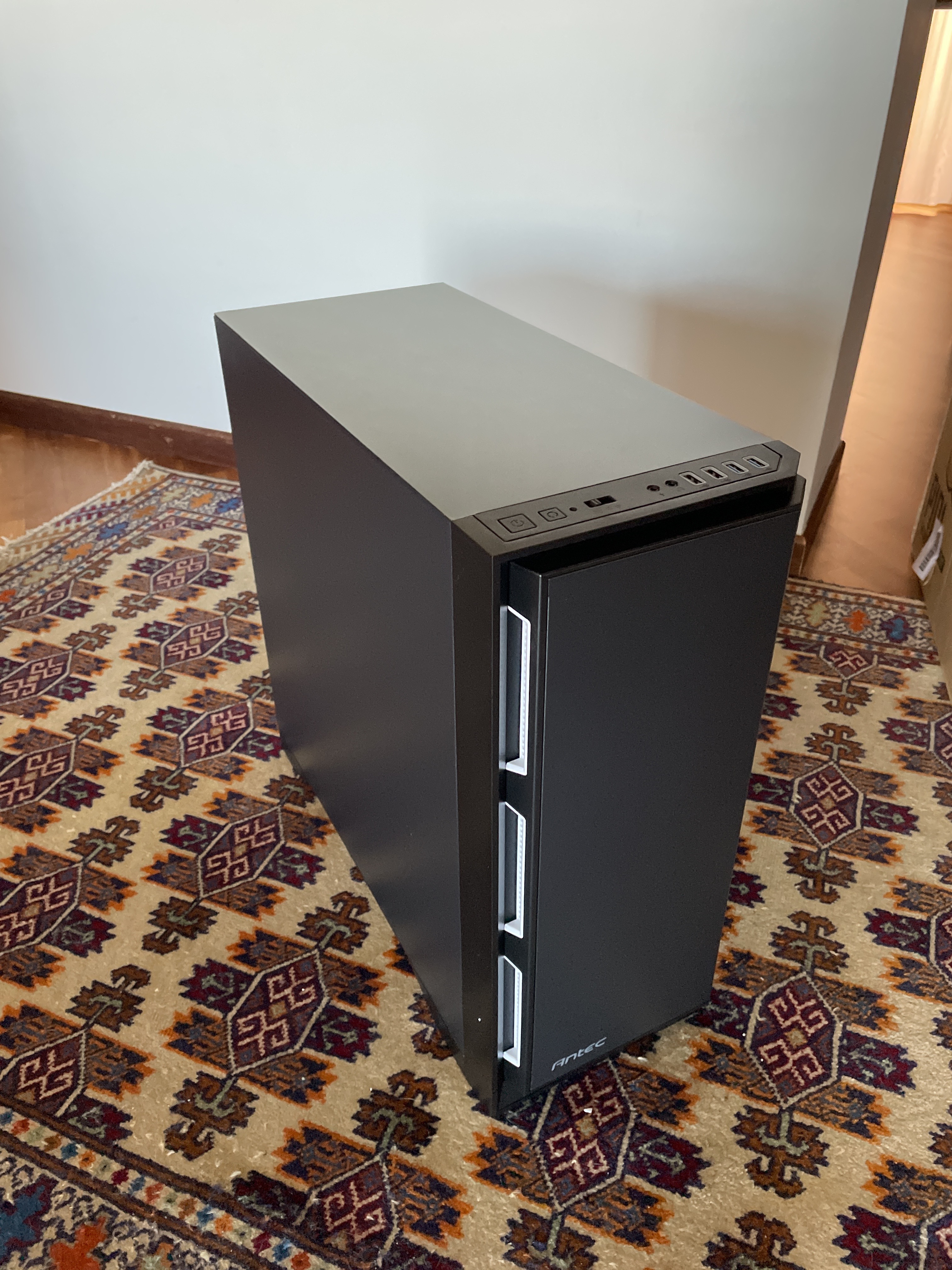
On my friend’s recommendation, I installed Unraid, which at the time was relatively cheap. That OS has helped me a lot. It lets you easily manage a disk array with a cache pool, manage VMs, and create Docker containers. For a beginner, it is an incredible system!
Fast forward to today, and I still have the very same server (with a bit more RAM) and I have expanded to a full home network: a MikroTik router, segmented networks, managed switches, local IoT devices, and a site-to-site VPN tunnel to the apartment where I now live in Stockholm. I’ve had many rewarding moments as I learned a lot, explored new technologies, and applied all the concepts I was learning in school in a real environment.
However, I also spent many sleepless nights debugging issues, causing widespread fear that a pretty famous containerized service was getting hacked, and watching YouTube videos on how to install Authentik.
I also tried virtualizing my home router, which made troubleshooting much harder than I expected. When something broke, I had to work out whether the problem was in the router, the virtual machine, or the host. For my setup, adding a PCIe Ethernet card to get separate WAN and LAN ports offered little saving over buying a dedicated router like the MikroTik hEX S, which I highly recommend. The savings weren’t worth the extra complexity. I’d keep the router on a separate device if I were starting again.
It has been such a wild ride, and I’ve had so much fun learning new things. These skills have helped me a lot in my career, and I think the homelab helped me during interviews and at work.
The experience at MongoDB
Last summer, I had the amazing opportunity to work at MongoDB as a Cloud Security Intern. During the interview process, every technical interviewer asked about my homelab: which services I hosted, how long I’d been running it, and how I’d put everything together.
And the best part is that most of them had a homelab too! That gave us a shared topic to talk about and an opportunity for me to explain my setup and what I’d learned.
However, my homelab wasn’t the only thing I brought to the interviews. I also had Capture the Flag experience and other projects I’d built. But it gave me something more concrete to discuss beyond the technologies listed on my CV.
During the internship, I worked with AWS services such as Identity and Access Management (IAM), CloudWatch, S3, and EC2. At some point, I realized that many of the concepts behind these services were familiar from what I’d been building and using in my homelab. For example, using Grafana in my homelab had already taught me how to read monitoring dashboards and interpret metrics, so those parts of CloudWatch felt familiar. Working with Docker Compose files and Dockerfiles had already made me comfortable defining setups in code. That made Terraform feel less unfamiliar when I started using it during the internship. This experience made me even more convinced that cloud security was the right career path for me!
Whether you want to work in cloud security or another area of tech, I think a homelab could help your career too.
If you want to start a homelab, you don’t need a Raspberry Pi or a shiny full-tower server. I’ll now give a general overview of the options and my opinion on them.
Things to consider before choosing
Before looking at the options, it is extremely important to understand some tradeoffs.
Can it always stay on?
You may want to host services inside your network, like DNS, network shares, or a VPN, which will require you to keep the device powered on all the time. Consider the electricity bill’s added costs.
How much computing power do you need?
Some services really are more complex than others. Wazuh, for example, collects security information from your computers and helps you spot suspicious activity. This kind of software is super cool, but it can be demanding in terms of memory and processing power.
Moreover, local streaming services like Jellyfin or Plex, which give you a “local Netflix” of legally downloaded media, may need to transcode the files (i.e., converting a video to different formats to accommodate streaming devices), so hardware that can accelerate video conversion (for example a GPU, even integrated in the processor) may be worth considering.
How much storage will you need?
Photos, videos, files, you name it. With a home server, you could store and access them wherever you are. The question is, will you have enough storage? This is worth considering for both a personal cloud and a home theater setup. Take into account a case with enough room for disks or extra adapters if you are using mini PCs or Raspberry Pis.
Where will you put it?
This is a point that almost no one talks about. If you go for a desktop PC or dedicated server, move it far away from your bedroom. When I built mine, I had it for years under my desk, in front of my bed: it was horrible. I was lucky enough to have found an incredible sound-dampened case, which I highly recommend, since it also has plenty of drive bays, but the slight noise was always there.
Additionally, over the summer, the heat it generated added up, and my bedroom felt like a sauna. 0/10 experience, don’t recommend. It did generate some nice heat during the winter, though.
To top it off, having a box constantly taking in air and then spitting it out the other side made the dust circulate much faster than in other environments.
Virtual machine/containers running on your local PC
This is where I’d start. Using the computer you already own lets you try a few services without buying another machine. However, the resources used by services running on your main machine may hinder the usability of the system, depending on what’s running. Additionally, you might not be able to leave it powered on 24/7, which could limit what you can do.
If I had to start again today, I would absolutely run some containers first on my computer, and then upgrade to a dedicated machine if needed (e.g., if you want more dedicated power, continuous availability in your house for local services like DNS filtering, or the ability to leave it on 24/7).
If you have a desktop PC and can run it 24/7, then it’s a great choice if the noise, heat, and dust situation is not a problem for you.
Old hardware
This is a great way to try out constantly running services, but might not be the cheapest option as old hardware may cost more to keep running, depending on the components and power consumption. If the device is still capable enough for your needs, it could be the best option for most people.
One thing to consider is that setting up everything from scratch may be hard for beginners.
Raspberry Pi
This is an amazing device if you don’t have relatively modern spare hardware and you want a more polished product. The guided installation makes it super intuitive to set up and the latest products have impressive resources. Just be aware that it uses ARM: on one hand, it will be more energy efficient. On the other hand, some software may not work.
Additionally, other costs must be considered: a power supply, a fan, expansion bays for SSDs or HDDs if needed, and a case for the device, which can be 3D printed. There are many expansions and accessories for the Pi, as these products have a large community behind them.
However, adding more drives can require extra adapters, enclosures, or power supplies, which can make expansion more complicated and expensive than on a desktop PC.
Finally, its small size makes it worth considering when space is limited.
Custom build
Whether you want to build a full tower or a mini PC, a custom build is the best option if you need several hard drives or want to choose and upgrade individual components. If you only want to run a few lightweight services, you may not need one. This closely relates to the “Old hardware” section, depending on your spare hardware (you could also mix old and new!). If you are also going for a NAS (Network Attached Storage), make sure to choose a motherboard with plenty of SATA ports and a case to fit the disks.
The operating system
To this day, I suggest installing Proxmox: an operating system that lets you run multiple virtual machines and LXC containers (mind you, not Docker containers) on one computer. This setup will give you full control of the machine, with a browser-based control panel. With this, you could try out different systems with a shared platform. However, this may add unnecessary complexity if you just want to run a few Docker containers and are a beginner with Linux.
Personally, I wouldn’t recommend Unraid today. Not because it’s a bad product, but because the current price is too high for me. Additionally, you will learn far more with Proxmox, and I don’t think Unraid will give you fewer headaches. The main advantage of Unraid, in my opinion, is the flexibility to combine data disks of different sizes and use their capacity. Traditional RAID configurations such as RAID 1, 5, and 6 can also use different-sized disks, but the usable capacity is limited by the smallest member. With Unraid, the parity disk must still be at least as large as the largest data disk.
Conclusion
If I were starting today, I’d use the computer I already have and pick one thing to try. I’d consider a dedicated machine once I needed more storage, more computing power, or services that stay available when my main computer is off. You don’t need to decide your entire setup before getting started. A cool first project could be setting up Pi-hole and seeing most annoying ads disappear!
And maybe you’ll find yourself stuck at 3 AM with a broken server, a bug you can’t solve, and no AI usage left. In that case, either start a goose farm or give cloud security a try!
I hope you found this helpful. If you need advice on getting started, feel free to DM me through any of the profiles linked below.
I manually wrote this article and used AI for minor grammar and readability edits.